常見 電郵軟件 / 流動裝置 電郵設置教學

*如沒有申請SSL服務的用戶, 請於軟件設置時選擇  非/無 SSL服務

*提供 IMAP 與 POP3 收信協定, 請自行選擇。

 IMAP 允許郵件保留在伺服器上,並在不同設備之間同步,而POP3 則通常將郵件下載到本地設備並從伺服器刪除


流動裝置設置

iOS 11 電郵設定方法

https://www.youtube.com/watch?v=4AGxJ-34L0U

Android 電郵設定方法

https://www.youtube.com/watch?v=GB94cgQMPzw

電郵軟件設置

Windows 10 Mail 電郵設定方法

https://www.youtube.com/watch?v=nyPyVTxhOlQ

macOS High Sierra 電郵設定方法

Outlook 2003 電郵設定方法

https://www.youtube.com/watch?v=GNxn5Kmjb_c

Outlook 2016 電郵設定方法

https://www.youtube.com/watch?v=kbgp-wiTGI4

如何新增電郵帳戶?

[適用於DirectAdmin內寄存之域名]


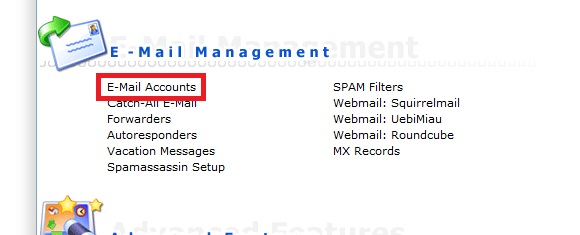
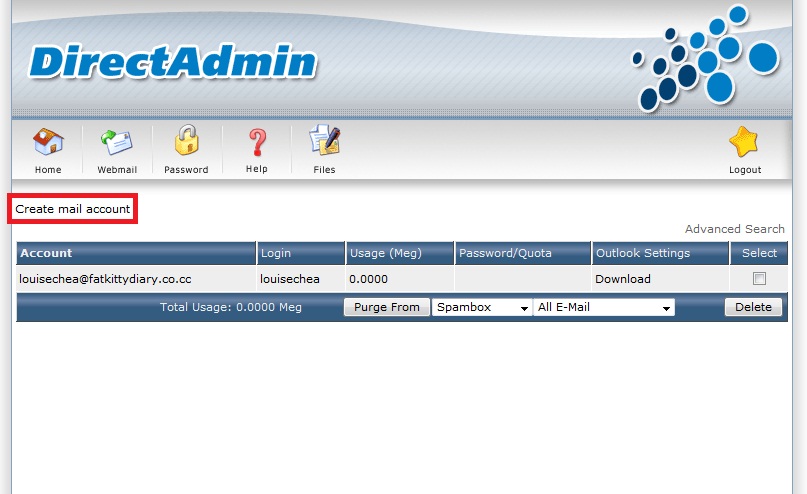
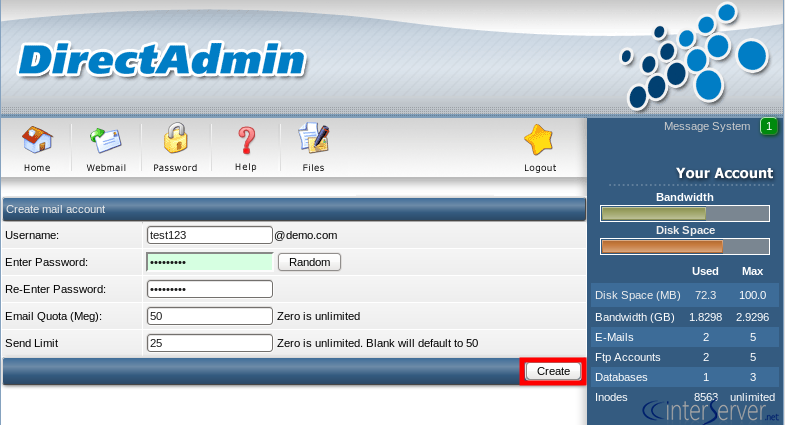
閣下可隨時登入DirectAdmin內的 E-Mail Management>E-Mail Accounts> Create mail account


Username:  <–  自定義名稱

Enter Password: <–  自定義密碼

Re-Enter Password: <–  自定義密碼

Email Quota (Meg): <– 如無指定要求,可設置為 0

Send Limit: <– 如無指定要求,可設置為 留空


如何重設電郵密碼?

[適用於DirectAdmin內寄存之域名]


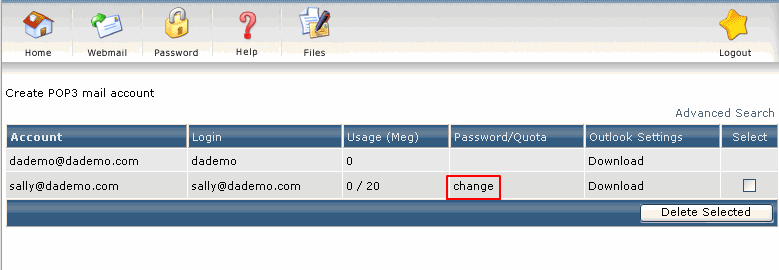
閣下若忘記於DirectAdmin內設置的電郵帳戶密碼,可隨時登入DirectAdmin內的


E-Mail Management>E-Mail Accounts> [選擇適用的電郵地址] > change


變更電郵密碼。


於DirectAdmin設置垃圾電郵過濾設定

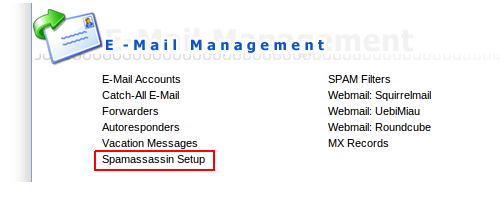
本公司所有戶口預設均未有啟用垃圾電郵過濾功能,如需使用,請登入網上控制台Directadmin後按Spamassassin Setup。


Where do you want the spam to go? (電郵一旦比系統確認為垃圾郵件如何處理?)

Inbox (don’t block it) – 繼續接收

Redirect it to the catch-all spam folder in your main imap account. – 轉寄到預設電郵戶口的”Spam”資料夾內

Send the spam to the appropriate users’s spam folder. – 轉寄到有關用戶電郵戶口的”Spam”資料夾內

Delete the spam.- 直接刪除

What score threshold do you wish to use?

Low Threshold (5.0)

Medium Threshold (7.5)

High Threshold (10.0)

這個為過濾敏感度設定,分數越低,過濾能力越高,但誤認垃圾電郵機會較大,相反分數越高,過濾能力較低,誤認垃圾電郵機會較細。一般可設定為7.5分。


Would you like to delete high scoring spam?

Yes, block all spam scoring higher than:  (1-50, no decimals)

No, do not block high scoring spam. Use only the threshold in the previous section.

一般分數越高代表電郵是垃圾郵件機會越高,用戶可於此設定高於10分的電郵即接刪除。


Do you wish to rewrite the subject of a spam email?

Yes, set the subject to the following: *****SPAM*****

No, leave the subject unchanged.

如果用戶選擇繼續接收垃圾郵件,可以在此為有關電郵的表題前加上特定字眼以便Outlook等電郵軟體可以於過濾時作特定安排


設定完全緊記按”Save”否則一切不會生效。


未能接收電郵


未能接收電郵有以下可能性:


是否第一次使用?
如是,比較大機會跟設定有關,歡迎致電或電郵向我們查詢。特別留意,電郵戶口使用者名稱應為整個電郵地址(如demo@isky.hk,登入名稱就是 demo@isky.hk而非demo,亦非控制台的登入名稱)。


是否突然未能使用?
有以下可能性:


是否使用Outlook Express並顯示0x800c0133?

Outlook Express單一資料夾不能接收多於2GB電郵,請刪除部份資料再試。

是否連寄存於本公司的網站也未能連上?

如不是,可能是閣下於Directadmin為電郵戶口設定的空間上限用滿或者整個戶口空間上限用滿,請刪除部份資料再試。

如是,可能入比較大機會是本公司防火牆封鎖了閣下的IP地址,大多情況是客戶重複輸入錯誤密碼登入FTP或電郵服務所引起,請先於以下網站取得閣下IP地址,然後致電或聯絡我們安排解鎖,謝謝。

網頁電郵網址 (Webmail)

我們提供二款網頁電郵,請以閣下打開瀏覽器後於地址欄打上閣下的域名後面加上對應的字符連結到該網頁電郵。


Roundcube

http://[你的域名]/roundcube

http://[你的域名]/webmail


Squirrelmail

http://[你的域名]/squirrelmail


備註:電郵登入名稱為電郵地址的全寫。

郵件未能送出(退信)


請參考以下退信原因

原因

描述 

沒有找到該收件者

550-5.1.1 The email account that you tried to reach does not exist.

於帳戶設定內沒有點選「我的(SMTP)伺服器需要驗証」

relay not permitted, authentication required

收件者信箱已滿

Recipient’s mailbox is full, message returned to sender.

超過每日限發電郵之上限

Unrouteable address

對方郵箱已滿

Quota exceeded